Prepare Your Ideas for Professional 3D Printing Services
Introduction: Bringing Your 3D Ideas to Life, Hassle-Free
Have a brilliant concept bubbling in your mind, a sketch on a napkin, or perhaps a vision for a custom part that could revolutionize your business or hobby? The world of 3D printing offers an incredible avenue to transform these intangible ideas into tangible realities. For individuals and businesses alike, navigating the path from concept to a perfectly printed object can seem daunting, especially if you don't own a 3D printer or possess advanced design skills. This comprehensive guide is designed to demystify that process, showing you exactly how to prepare your ideas for professional 3D printing services, ensuring your projects are a resounding success.
Whether you're looking for 3D printing services across Europe, including custom 3D printing in Luxembourg, or seeking expert advice on filament choices, this guide covers every crucial step. We'll walk you through everything from initial conceptualization and material selection to file preparation and engaging with a trusted service like PrintIn3D.ie. Our goal is to empower you with the knowledge needed to confidently approach any 3D printing project, ensuring a seamless and hassle-free experience. Prepare to turn your innovative ideas into high-quality physical products with the support of professional expertise.
What You'll Need
- A clear idea or concept for a 3D printable object.
- Basic sketching tools (pencil, paper) or digital equivalents.
- Access to a computer with internet connectivity.
- Optional: Basic CAD software knowledge or a willingness to learn.
- A trusted professional 3D printing partner like PrintIn3D.ie.
Step 1: Conceptualize Your Vision – From Idea to Sketch
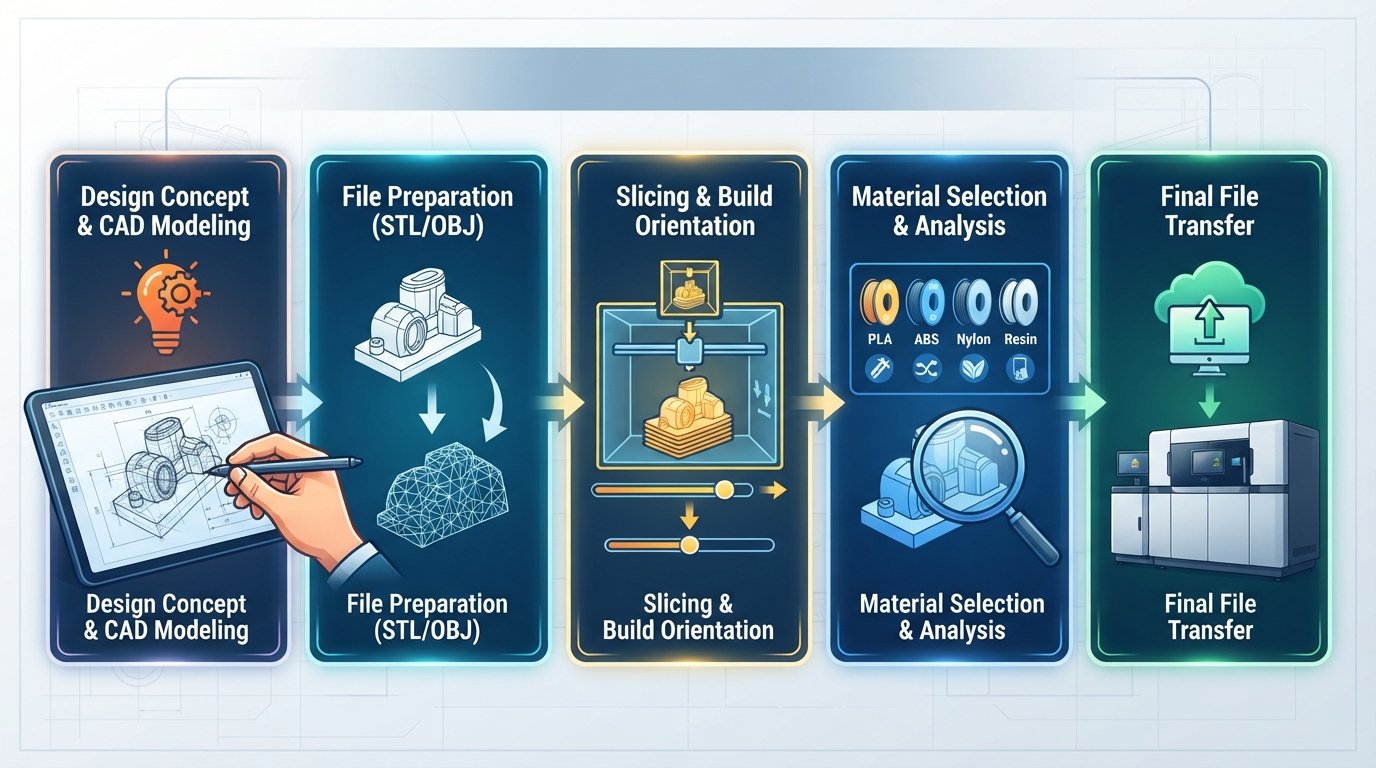
Every great 3D print begins with a solid idea. Before you even think about software or filaments, you need to clearly define what you want to create, its purpose, and how it will function. This initial conceptualization phase is critical, as it lays the groundwork for all subsequent steps. Don't rush it; a well-thought-out concept will save you time and resources down the line.
Start by asking yourself key questions: What problem does this object solve? What features must it have? What are its critical dimensions? How will it interact with other components or its environment? Visualizing your idea through sketches is an excellent way to refine your concept. Don't worry about artistic skill; simple drawings are often sufficient to convey your intent and identify potential design challenges early on. Multiple iterations of sketches can help you explore different forms and functionalities.
- Brainstorm and Define: Clearly articulate the purpose and core functionality of your object. Write down all requirements and constraints.
- Sketch Your Idea: Draw your object from various angles. Include dimensions where possible, even if approximate. This helps solidify its form and scale.
- Gather Reference Images: If your idea is inspired by existing objects, collect photos or diagrams. These can be invaluable for designers.
- Consider Functionality: Think about how the object will be used. Does it need to be strong, flexible, waterproof, or heat-resistant? These factors will influence material choice.
Tip: Don't be afraid to experiment with multiple design options during the sketching phase. Sometimes, the best solution emerges after exploring several alternatives. Consider creating a mood board or collecting images that inspire the aesthetic of your design.
Step 2: Choose Your Material Wisely – Understanding Filaments
Once you have a clear concept, the next vital step is to consider the material. The choice of 3D printer filament is not merely aesthetic; it profoundly impacts the strength, flexibility, durability, and overall suitability of your printed object for its intended application. Professional 3D printing services offer a wide range of materials, each with unique properties. Understanding the basics will help you make an informed decision and communicate your needs effectively.
For most common applications, PLA (Polylactic Acid) and PETG (Polyethylene Terephthalate Glycol) are excellent starting points. PLA is known for being easy to print, biodegradable, and available in many colours, making it ideal for prototypes, decorative items, and non-functional parts. PETG, on the other hand, offers greater strength, flexibility, and temperature resistance, making it suitable for functional parts, mechanical components, and outdoor applications. If you're looking to buy 3D filament in Luxembourg or need to check the filament PETG Luxembourg prix, PrintIn3D.ie offers a selection of quality filaments like Bambu Lab and SUNLU with fast delivery across Europe.
- Identify Key Material Properties: Based on your object's function (from Step 1), determine if it needs to be strong, flexible, food-safe, UV-resistant, heat-resistant, etc.
- Research Common Filaments:
- PLA (Polylactic Acid): Easy to print, good for aesthetics, prototypes. Not very strong or heat-resistant.
- PETG (Polyethylene Terephthalate Glycol): Stronger and more flexible than PLA, good layer adhesion, moderate heat resistance. Excellent for functional parts.
- ABS (Acrylonitrile Butadiene Styrene): Very strong, durable, good for engineering parts, but can be tricky to print without an enclosed printer.
- TPU (Thermoplastic Polyurethane): Flexible, rubber-like material, excellent for phone cases, gaskets, or flexible components.
- Nylon: Very strong, durable, abrasion-resistant. Often used for gears and tools.
- Consult with Your Service Provider: If unsure, discuss your project's requirements with PrintIn3D.ie. Our experts can recommend the best filament for your specific needs, whether you're interested in achat filament 3d Luxembourg or custom printing.
Warning: Choosing the wrong material can lead to a print that fails its intended purpose, wastes time and money, and doesn't meet your expectations. Always prioritise functionality and durability over cost if your part is critical.
Step 3: Bring Your Concept to Life – The 3D Design Phase
With your idea conceptualized and material considered, it's time to translate your sketches into a digital 3D model. This typically involves using Computer-Aided Design (CAD) software. This step is where your vision truly begins to take shape in a format that a 3D printer can understand.
If you have experience with CAD, you can design your model yourself using software like Fusion 360, SolidWorks, Tinkercad (beginner-friendly), or Blender (for more artistic models). Focus on precision, ensuring all dimensions are accurate and the model is "watertight" (no gaps or holes in the geometry). For those without CAD expertise, don't worry! Professional services like PrintIn3D.ie offer 3D design services. We can convert your sketches, existing physical objects (via 3D scanning), or even detailed descriptions into print-ready 3D models. This is particularly useful for prototypage rapide Luxembourg and obtaining a design 3d professionnel Luxembourg without needing to master complex software yourself.
- Choose Your Design Method:
- DIY Design: If you have CAD skills, select appropriate software (e.g., Fusion 360 for mechanical parts, Blender for organic shapes). Pay close attention to scale, dimensions, and wall thickness.
- Professional 3D Design Service: If you lack the skills or time, engage a service like PrintIn3D.ie. Simply provide your sketches, dimensions, and functional requirements. This is an excellent option for leveraging a 3d design service Luxembourg to get your ideas off the ground efficiently.
- Focus on Printability: Design your object with 3D printing in mind. Consider overhangs, supports, and minimum feature sizes. A professional designer will factor these in automatically.
- Iterate and Refine: Don't expect perfection on the first try. Review your digital model (or the one provided by your design service) carefully. Request changes or make adjustments until it perfectly matches your vision.
Tip: If designing yourself, start with basic shapes and gradually add detail. Utilise online tutorials or community forums for your chosen CAD software. For complex mechanical parts, ensure all components fit together correctly in the digital model before printing. PrintIn3D.ie can assist with everything from small 3D design services for mechanical parts to medium-sized designs from DWG files.
Step 4: Prepare Your Files for Seamless Printing
Once your 3D model is complete, it needs to be prepared in a format suitable for 3D printing. The most common file format for this is an STL (STereoLithography) file, although OBJ, 3MF, and STEP files are also widely used, particularly for more complex models or those requiring specific material properties to be encoded. This step ensures that your digital design can be accurately interpreted by the 3D printer's software (slicer).
Proper file preparation involves ensuring the model is "watertight" – meaning it has no holes, inverted normals, or self-intersecting geometry. These issues can confuse the slicer software, leading to errors or failed prints. Additionally, check the resolution of your mesh; a model that is too low-polygon might appear blocky, while an excessively high-polygon model can be unnecessarily large and difficult to process. Many CAD programs have export options for these formats, and some also include tools for basic mesh repair.
- Export to a Print-Ready Format:
- STL: The industry standard. Ensure your CAD software exports a high-quality mesh.
- OBJ: Can support colour and texture, useful for visual models.
- 3MF: A newer format that includes more print information (colour, materials, support structures) and can be more robust than STL.
- STEP: Often preferred for engineering parts as it represents solid geometry, not just a mesh.
- Check for Errors: Use built-in CAD tools or online services to check your STL/OBJ for common printing errors (e.g., non-manifold edges, inverted normals, holes). Services like Netfabb Basic (now part of Fusion 360) or online validators can help.
- Consider Scale and Orientation: Ensure your model is scaled correctly (e.g., in millimeters) and optimally oriented for printing (e.g., flat on the build plate to minimise supports). Your professional service can assist with final orientation.
- Compress Files (if necessary): For very large files, consider compressing them, but always ensure the integrity of the model is maintained.
Warning: Submitting a faulty 3D model file is one of the most common reasons for delays or failed prints. Always double-check your file before sending it to a professional service. PrintIn3D.ie provides a guide on submitting your 3D files for printing in Luxembourg, ensuring a smooth process.
Step 5: Engaging with a Professional 3D Printing Service
You've got your idea, chosen your material, and prepared your 3D model file. Now it's time to hand it over to the experts. Engaging with a professional 3D printing service like PrintIn3D.ie offers numerous advantages over trying to manage a 3D printer yourself, especially for complex projects or when consistent quality is paramount. It's a hassle-free solution that brings your ideas to life without the investment in equipment, software, or the steep learning curve.
A professional service provides access to industrial-grade printers, a wider range of high-quality filaments (like Bambu Lab and SUNLU, available for buy 3D filament Luxembourg customers), and expertise in optimising prints for strength, accuracy, and finish. Whether you need impression 3d sur mesure Luxembourg for a unique art piece, a prototypage rapide Luxembourg for a new product, or simply need to print a 3D model, a service can handle it all. They also offer valuable advice on design optimisation and material selection. Think of it as hiring a 3d print bedrijf huren Luxemburg without the overheads.
- Research and Select a Service: Look for a provider with a strong reputation, good customer reviews (see PrintIn3D's reviews), and transparent pricing. PrintIn3D.ie is an award-winning service known for quality and fast delivery across the EU/EEA.
- Upload Your File and Specify Requirements: On our platform, you can upload your 3D model, select your desired material and colour, and specify any critical requirements (e.g., layer height, infill density, specific tolerances).
- Request a Quote: The service will analyse your model and provide a detailed quote, including material costs, print time, and shipping. PrintIn3D.ie offers fast 3D print estimates.
- Communicate Clearly: Don't hesitate to ask questions about the process, materials, or turnaround times. Clear communication ensures your expectations are met. PrintIn3D offers friendly WhatsApp support.
Tip: For urgent projects, inquire about expedited services. PrintIn3D.ie offers various turnaround times, including 8-hour, 13-hour, and 28-hour custom printing services, ensuring your project meets deadlines. When you need reliable service impression 3d Luxembourg, we are your go-to partner.
Step 6: Reviewing Your Quote and Finalizing Your Order
Once you've submitted your 3D model file and chosen your specifications, the professional 3D printing service will provide you with a detailed quote. This is a critical step where you confirm all the details before production begins. It's essential to meticulously review every aspect of the quote to ensure it aligns perfectly with your expectations and project requirements.
The quote will typically break down costs for the material chosen, the estimated print time, any post-processing services, and shipping. It will also outline the expected lead time for your order. If anything in the quote seems unclear or doesn't match your initial requests, this is the time to ask for clarification. Good communication with your service provider, such as PrintIn3D.ie, is key to avoiding misunderstandings and ensuring a smooth process from ordering to delivery. Our goal is always to provide transparent pricing and clear information, so you know exactly what to expect when you order custom 3D printing from us.
- Examine All Details: Check the specified material, colour, print resolution (layer height), infill percentage, and any special instructions you provided.
- Verify Dimensions and Scale: Confirm that the model's dimensions in the quote match your design's intended size. If the service offers a visual representation of your model, check it carefully.
- Review Costs: Understand the breakdown of charges, including material, labour (print time), and shipping to your location in Luxembourg or elsewhere in the EU/EEA.
- Confirm Turnaround Time: Ensure the estimated delivery date works with your project timeline. If it's a tight deadline, reconfirm the express options.
- Ask Questions: If any part of the quote is confusing, or if you have any last-minute concerns, contact the service provider. For PrintIn3D.ie, our friendly WhatsApp support is always ready to assist.
- Approve and Proceed: Once you are satisfied with all aspects of the quote, formally approve it to initiate the printing process.
Tip: For complex or very large orders, consider requesting a small prototype or a sample print of a critical feature before committing to the full batch. This allows you to physically assess the material, finish, and accuracy. This can be especially valuable for 3D printing in bulk for businesses in Luxembourg.
Step 7: Post-Processing and Finishing Touches (Where Applicable)
While professional 3D printing services deliver high-quality parts directly from the printer, some projects may benefit from or require additional post-processing steps. These finishing touches can enhance the aesthetic appeal, improve functional properties, or prepare the part for assembly into a larger product. Understanding these options beforehand can help you set realistic expectations for the final product and factor any additional time or cost into your project plan.
Common post-processing techniques include support removal, sanding, priming, painting, and sometimes even chemical smoothing for specific materials. For most hobbyist projects or functional prototypes, minimal post-processing (often just support removal) might be sufficient. However, for end-use parts, display models, or components requiring a very smooth surface finish, these steps become more critical. Discuss your desired finish with your professional 3D printing service, as some may offer these services in-house, making your experience even more hassle-free.
- Support Removal: Many 3D prints require temporary support structures to build overhangs. Your service will typically remove these, but you might need to do some minor clean-up.
- Sanding and Polishing: To achieve a smoother surface and hide layer lines, parts can be sanded with progressively finer grits and then polished.
- Priming and Painting: For custom colours or a uniform finish, parts can be primed and painted. This is common for models, figurines, or architectural prototypes.
- Assembly: If your design consists of multiple printed parts, you may need to assemble them using adhesives, fasteners, or snap-fit mechanisms.
- Chemical Smoothing: Certain materials (like ABS) can be chemically smoothed to create a very glossy, almost injection-moulded look. This is a specialised process.
- Sealing: For parts that need to be waterproof or airtight, a sealant or coating may be applied.
Warning: Post-processing can alter dimensions slightly or change material properties. If precise tolerances are critical, test your post-processing methods on a sample piece first. Always handle newly printed parts carefully, especially during support removal, to avoid damage.
Common Mistakes to Avoid
Navigating the world of 3D printing can be exciting, but it's also easy to fall into common pitfalls that can lead to frustration, wasted time, and suboptimal results. By being aware of these mistakes, you can significantly improve your chances of a successful project, especially when collaborating with professional 3D printing services.
- Ignoring Material Properties: One of the biggest mistakes is choosing a material based solely on cost or colour without considering its functional properties. A decorative PLA print won't hold up as a high-stress mechanical component, and vice-versa. Always align your material choice with the object's intended use, as discussed in Step 2.
- Poor File Preparation: Submitting a 3D model with errors (non-manifold edges, holes, inverted normals) is a recipe for disaster. These "non-watertight" models can cause slicing software to fail or produce prints with gaps and inconsistencies. Always validate your STL, OBJ, or 3MF files.
- Lack of Clear Communication: Vague instructions or assumptions about what your 3D printing service understands can lead to results that don't match your vision. Be explicit about dimensions, critical tolerances, desired finish, and application. Don't assume the service knows your intent.
- Underestimating Design Complexity: Attempting to design overly complex geometries with minimal experience can lead to unprintable models or models that require excessive support structures, increasing cost and print time. Start simple and build complexity. If stuck, leverage professional 3D design services.
- Neglecting Scale and Units: Sending a file designed in inches when the printer expects millimeters (or vice versa) can result in a model that's either tiny or gargantuan. Always confirm the units used in your design and communicate them clearly.
- Skipping Prototyping for Critical Parts: For functional components, especially those with tight tolerances or complex assemblies, skipping a prototype print can be costly. A small, inexpensive prototype can reveal design flaws before a large batch production. This is where prototypage rapide Luxembourg becomes invaluable.
- Overlooking Post-Processing Needs: Assuming a print will come off the bed ready for immediate use, without any need for support removal, sanding, or painting, can lead to disappointment. Factor in post-processing when envisioning your final product.
FAQ
What file formats do I need for professional 3D printing services?
The most common file format accepted by professional 3D printing services is STL (STereoLithography). It's a universal standard that describes the surface geometry of a 3D object. Other widely accepted formats include OBJ, which can support colour and texture information, and 3MF, a newer format that contains more comprehensive model data. For engineering parts, STEP files are often preferred as they represent solid geometry rather than a mesh. Always check with your chosen service provider like PrintIn3D.ie, but an STL file is usually a safe bet. You can find more details on submitting your 3D files for printing in Luxembourg on our FAQ page.
Can PrintIn3D.ie help with 3D design if I only have an idea or a sketch?
Absolutely! At PrintIn3D.ie, we specialise in bringing your ideas to life, even if you don't have a ready-to-print 3D model. Our expert team offers comprehensive 3D design services. Whether you have a simple sketch, a detailed drawing, a physical object you want to duplicate (via 3D scanning), or just a concept in your mind, we can work with you to create a professional, print-ready 3D model. This means you can get a design 3d professionnel Luxembourg without needing any CAD software experience yourself.
How long does it take to get a 3D print delivered to Luxembourg?
PrintIn3D.ie prides itself on fast turnaround times and efficient delivery across the EU/EEA, including Luxembourg. For filament orders, we offer same-day dispatch before 4 PM, with typical delivery times for Europe being 5-7 working days. For custom 3D prints, the production time depends on the complexity and size of your model, as well as the chosen material. We offer various service tiers, from standard to expedited options like 8-hour, 13-hour, and 28-hour custom printing services. Once printed, shipping to Luxembourg usually falls within our standard European delivery window. You can get an exact estimate by uploading your file and requesting a quote on our website.
What's the difference between PLA and PETG filaments, and which one should I choose?
PLA (Polylactic Acid) and PETG (Polyethylene Terephthalate Glycol) are two of the most popular 3D printing filaments, each with distinct properties. PLA is easier to print, offers good aesthetic quality, and is biodegradable, making it ideal for prototypes, decorative items, and models that don't require high strength or heat resistance. PETG, on the other hand, is known for its superior strength, flexibility, durability, and better temperature and chemical resistance compared to PLA. It's often chosen for functional parts, mechanical components, and items that need to withstand more wear and tear or outdoor conditions. For customers looking for achat filament 3d Luxembourg, PrintIn3D.ie offers both high-quality PLA and filament PETG Luxembourg prix, with options from leading brands like Bambu Lab and SUNLU. Your choice should always align with the specific functional requirements of your 3D printed object.
Why should I use a professional 3D printing service instead of buying my own 3D printer for projects in Luxembourg?
While owning a 3D printer can be appealing, utilizing a professional 3D printing service like PrintIn3D.ie offers significant advantages, especially for businesses or complex projects in Luxembourg. Firstly, it eliminates the substantial upfront cost of purchasing a printer, alongside ongoing expenses for maintenance, software, and materials. You gain access to industrial-grade machines capable of higher precision, larger prints, and a wider array of specialty materials that consumer printers can't handle. Secondly, it saves you countless hours of learning the intricacies of 3D printing, troubleshooting common issues, and perfecting print settings. Professional services provide expert knowledge, consistent quality, and faster turnaround times for prototypage rapide Luxembourg or impression 3d sur mesure Luxembourg. It’s a truly hassle-free way to bring your ideas to life without becoming a 3D printing technician yourself, acting as your reliable 3d print bedrijf huren luxemburg.
Next Steps: Turn Your Ideas into Reality with PrintIn3D.ie
You now have a clear roadmap to prepare your ideas for professional 3D printing. Ready to transform your concepts into tangible objects? Visit PrintIn3D.ie/3d-printing-services to explore our custom 3D printing options, get a quick quote, or learn more about our 3D design services and range of quality 3D printer filaments. Let us be your trusted partner in bringing your 3D dreams to life with ease and expertise, serving customers across the EU/EEA, including Luxembourg.